🧩 P2P Web Applications Proxy
Run any self-hosted web application on your home server, mini-PC, or NAS (127.0.0.1:<port>) and open it directly inside On My Disk Direct from anywhere — with zero port forwarding, zero dynamic DNS, zero reverse-proxy setup, and no VPN clients.
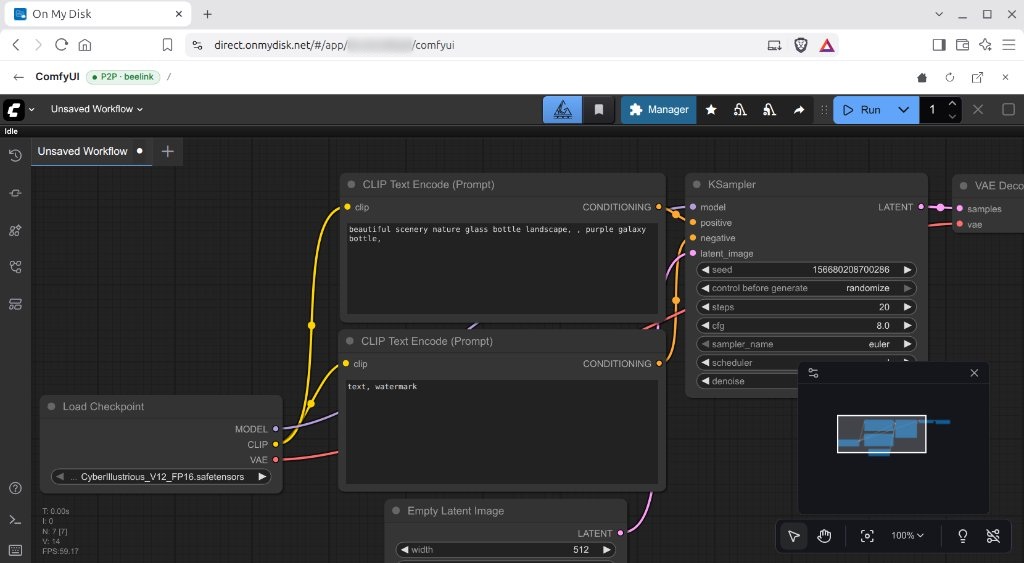
When you open your paired node in On My Disk Direct, active local web apps appear right alongside your shared folders in the node root. Clicking an app launches it inside an embedded workspace tunneled over encrypted WebRTC DataChannels.
1. How It Works
Unlike traditional reverse proxies (nginx, Cloudflare Tunnels, or Tailscale Funnel) that expose public endpoints or require installing a daemon on every client device, the On My Disk P2P App Proxy operates entirely inside your browser over your existing peer-to-peer connection:
- Zero-Config Owner Discovery (
/api/node/apps):- When you open your node’s root directory, On My Disk queries On My Chat (
:4000) for configured local web applications. - For every entry in
[apps], the node performs a fast loopback TCP check (127.0.0.1/::1). Only applications whose local port is currently listening are shown — stopped services stay hidden automatically.
- When you open your node’s root directory, On My Disk queries On My Chat (
- Strict Owner-Only Access:
- App discovery and port multiplexing are restricted exclusively to the cryptographically paired Node Owner (
DID/omd_key). - Guests, public share visitors, and other users never see or access your local applications, and your apps can remain bound strictly to
127.0.0.1.
- App discovery and port multiplexing are restricted exclusively to the cryptographically paired Node Owner (
- Multiplexed WebRTC Port Tunneling (
port:<port>):- Selecting an app opens dedicated WebRTC DataChannels to
127.0.0.1:<port>through the C++onmydisknode daemon (HttpDrive).
- Selecting an app opens dedicated WebRTC DataChannels to
- Service Worker Virtual Path & Full Web Compatibility:
- A browser Service Worker intercepts
/__app/<linkId>/<slug>/...and transparently rewrites HTML base paths,fetch(),XMLHttpRequest,WebSocketupgrades, redirects, and an isolated per-app cookie jar. - Instant Media Streaming (
206 Partial Content): Open-endedRange: bytes=N-requests from<video>and<audio>players are automatically chunked into2 MBWebRTC frames so high-bitrate media starts playing and seeks immediately without buffering entire files in memory.
- A browser Service Worker intercepts
2. Pre-Configured & Popular Self-Hosted Applications
Out of the box, On My Chat includes ready-to-use templates in config.ini that appear automatically in your node root whenever their service is running:
| Application | Default Port & Path | Icon | Description |
|---|---|---|---|
| ComfyUI | :8188/ | diagram-3-fill | Node-based local diffusion workflow studio (SDXL, Flux, Krea 2, Wan) with live WebSocket queue progress. |
| AI Horde | :4000/horde | gpu-card | Built-in AI Horde Dreamer Worker console — monitor Kudos earned, toggle local SDXL models, and manage daily cloud caps. |
| GenVault | :8077/ | collection-play-fill | Local AI Media Vault for browsing, organizing, and streaming generated images, video clips, and prompts. |
| Memos | :5230/ | stickies-fill | Lightweight self-hosted personal notes and knowledge capture hub. |
| DocuSeal | :3000/ | file-earmark-check-fill | Self-hosted digital document signing and form automation suite. |
| Gitea | :3001/ | git | Lightweight self-hosted Git service and code hosting platform. |
| Home Assistant | :8123/ | house-gear-fill | Open-source local smart home automation dashboard. |
3. Adding Your Own Local Web Apps (config.ini)
You can expose any localhost web application (dashboards, media libraries, Git servers, home automation, or custom internal tools) by adding it to the [apps] section of /opt/onmychat/config.ini (or ~/OnMyChat/config.ini):
Pipe-Delimited Format (Recommended)
[apps]
# Format:
# slug = Display Name | Port | EntryPath | BootstrapIconName | Description

genvault = GenVault | 8077 | / | collection-play-fill | Local AI Media Vault
comfyui  = ComfyUI | 8188 | / | diagram-3-fill | Local AI Workflow Studio
memos    = Memos | 5230 | / | stickies-fill | Personal Notes
docuseal = DocuSeal | 3000 | / | file-earmark-check-fill | Document Signing
gitea    = Gitea | 3001 | / | git | Self-Hosted Git Service
hass     = Home Assistant | 8123 | / | house-gear-fill | Smart Home Dashboard
Shorthand & JSON Formats
- Port-only shorthand (uses the capitalized slug as the title and
/as the entry path):[apps] grafana = 3002 - JSON format (useful if you want to disable live TCP port probing with
"probe": false):[apps] jupyter = {"name": "JupyterLab", "port": 8888, "entryPath": "/lab", "icon": "code-square", "description": "Interactive Notebooks", "probe": true} - Disabling a configured app: Set the value to
off,false,0, ordisabled(for example,comfyui = offormemos = off).
No Restart Required:
/api/node/appsreadsconfig.iniand probes localhost ports dynamically whenever you refresh your node’s root folder in On My Disk Direct.
4. Supported App Icons
The BootstrapIconName field accepts standard Bootstrap Icons names. Popular icons pre-bundled in the On My Disk Direct UI include:
- AI & Compute:
rocket-takeoff-fill,diagram-3-fill,cpu-fill,gpu-card,robot,stars,lightning-charge-fill - Media & Creative:
collection-play-fill,images,film,music-note-beamed,camera-reels-fill,palette-fill - Productivity & Docs:
stickies-fill,journal-richtext,file-earmark-check-fill,kanban-fill,calendar-check-fill,chat-dots-fill - Developer & Infrastructure:
code-square,git,terminal-fill,database-fill,hdd-network-fill,sliders,bar-chart-line-fill,globe2,house-gear-fill,shield-lock-fill,window-stack
5. Best Practices for Self-Hosted Apps
- Bind to
127.0.0.1Only: Because theonmydiskdaemon connects to your app over the local loopback interface on the host machine, you should bind your web apps to127.0.0.1:<port>instead of0.0.0.0:<port>. This keeps them completely invisible on your LAN and public WAN while remaining accessible to you over P2P. - Subpath vs. Root Path Apps: Each proxied app gets its own isolated virtual root via the Service Worker (
/__app/<linkId>/<slug>/), so applications that expect to run at/(without a customBASE_URLsetting) work out of the box. - In-App Navigation Toolbar: While an app is open inside On My Disk Direct, use the top proxy toolbar to navigate Back / Forward, Reload the app frame, see the active
127.0.0.1:<port>tunnel badge, or return to your files.