🛠️ Built-in Agentic Loop & MCP Server
On My Chat goes far beyond plain question-and-answer chat. Built-in Model Context Protocol (MCP) support powers two complementary workflows:
- Autonomous In-Chat Agentic Loop: Multi-step planning and verified tool execution directly inside Chats — inspecting templates, searching your private knowledge base, and producing formatted Office documents on your storage node.
- Standard MCP Server for External Harnesses: Expose your On My Disk files, Memory Cards, Office document engines, and project trackers to external agents such as Claude Desktop, OpenCode, Claude Code, Cursor, Antigravity, and Hermes.
1. Autonomous In-Chat Agentic Loop
Trigger multi-step tool execution in Chats using /mcp, /tools, /doc (or naturally ask the assistant to create or update a file on your storage):
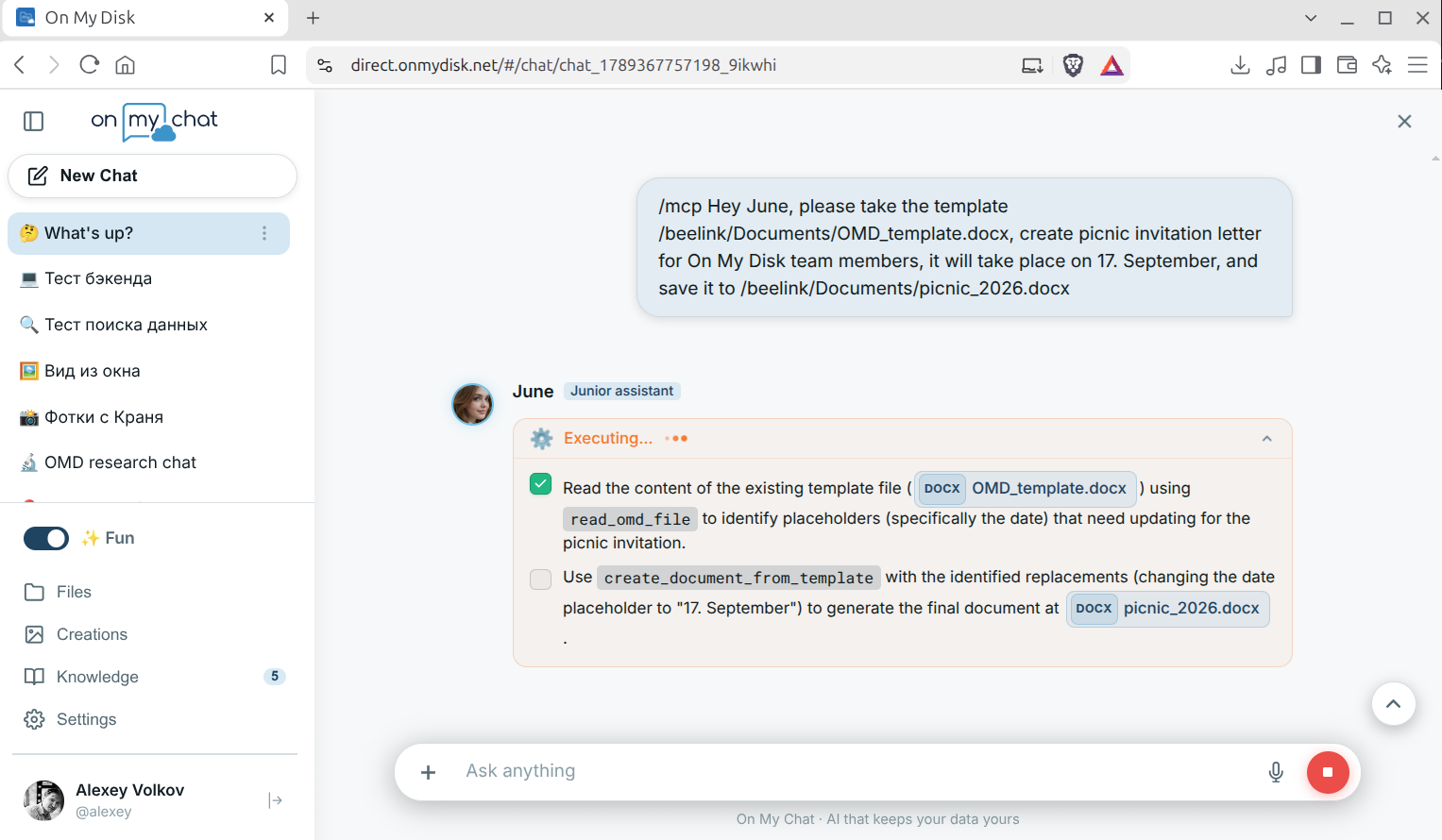
- Step-by-Step Planning & Live Progress: The assistant drafts a structured checklist of steps, selects the right tools, and streams real-time execution status right in the conversation:
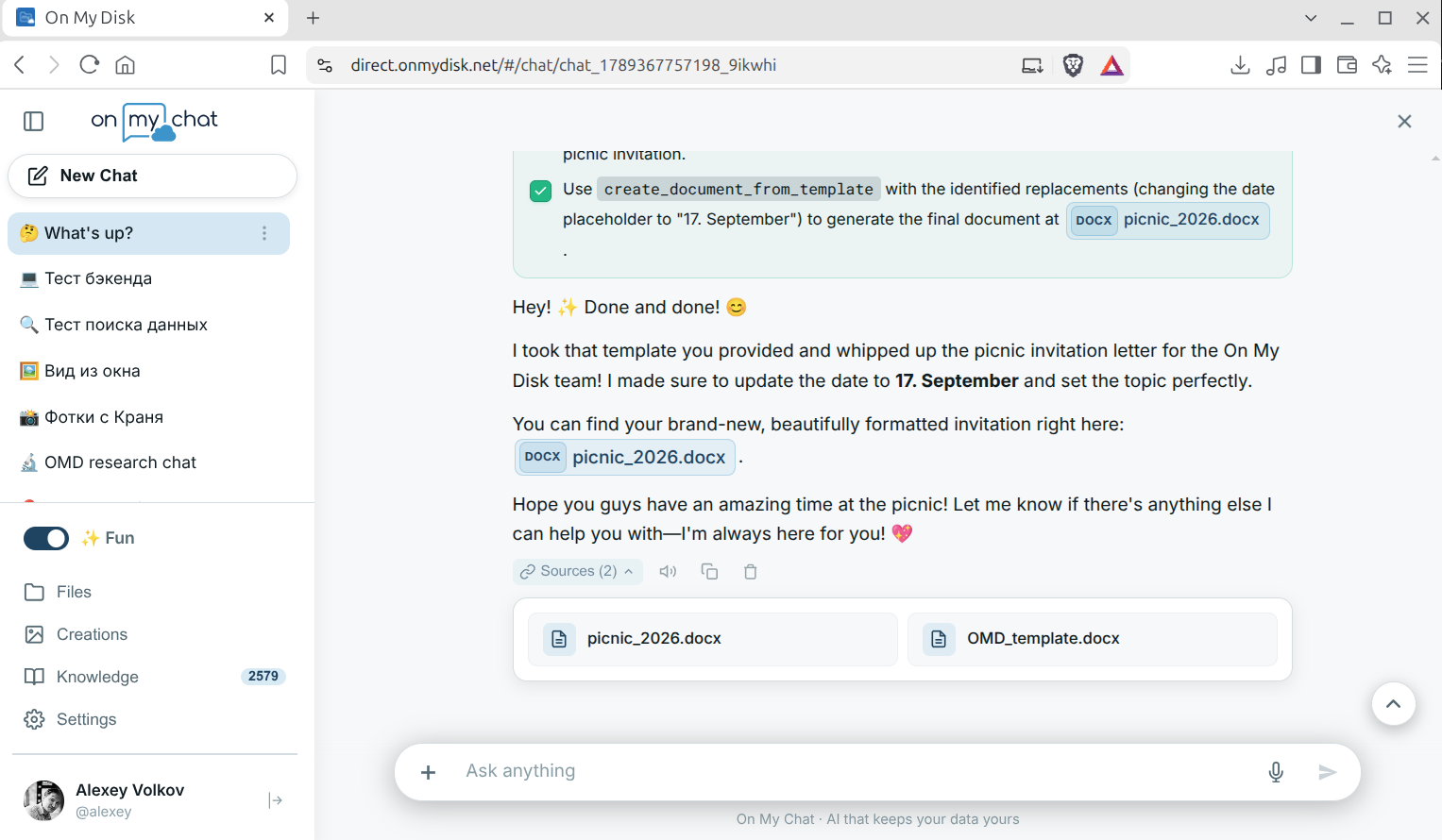
- Verified Deliverables on Your Storage: Once all steps succeed, generated or updated documents appear as interactive file chips in the chat message — click to open, preview, or edit them directly in the built-in viewer:
2. Built-in Tool Catalog
Both the in-chat agentic loop and external MCP clients share the same permission-aware toolset:
📁 On My Disk Storage & Semantic Memory
list_omd_files/find_omd_file: List directories with size/date metadata or locate files by natural-language criteria (e.g. “latest invoice PDF”).read_omd_file/write_omd_file: Read text, code, PDFs, and Office documents or write new files directly to your storage shares.search_memory: Query your unified Memory Cards index (ChromaDB) across documents, notes, photos, and people.
📄 Rich Office Document Suite (WordCraft, GridCraft, DeckCraft)
Unlike plain-text exporters that strip formatting, the Craft engines manipulate native document structures with full layout, table, and branding fidelity:
read_document: Inspect.docx,.odt,.xlsx, or.pptxfiles as clean text, structured Markdown, or element trees.create_document: Generate formatted Word documents (.docx,.odt,.rtf), Excel spreadsheets (.xlsx), and PowerPoint slide decks (.pptx).create_document_from_template: Clone an existing branded template (.docx/.pptx/.xlsx) and replace placeholders while preserving headers, logos, fonts, and table styles.edit_document&convert_document: Apply surgical structural edits or convert seamlessly between Office, Markdown, CSV, and PDF formats.
📋 Project Management (Plane.so)
list_plane_workspaces,list_plane_projects,list_plane_issues,get_plane_issue_details,create_plane_issue,update_plane_issue_state,add_plane_issue_comment— authenticated automatically using the credentials stored in your encrypted DID profile.
3. Connecting External AI Clients via MCP
Every On My Chat node includes a standard FastMCP STDIO server (/opt/onmychat/mcp_server.py on Linux, %LOCALAPPDATA%\OnMyChat\mcp_server.py on Windows). Add it to Claude Desktop, OpenCode, Claude Code, Cursor, or Antigravity to grant your coding or desktop agent direct access to your node:
{
  "mcpServers": {
    "onmychat": {
      "command": "/opt/onmychat/venv/bin/python",
      "args": ["/opt/onmychat/mcp_server.py"],
      "env": {
        "OMD_STORAGE": "beelink"
      }
    }
  }
}