🧠 Storage as Knowledge (Private RAG & Memory Cards)
Retrieval-Augmented Generation (RAG) turns your On My Disk folders, notes, and camera roll into a living, multimodal memory for On My Chat. Even if you run a lightweight laptop in Agentic P2P mode (AI_PROVIDER = agentic), document parsing, embeddings, and your ChromaDB vector database remain 100% local on your own disk.
On-Device Facial Recognition & Multimodal Retrieval
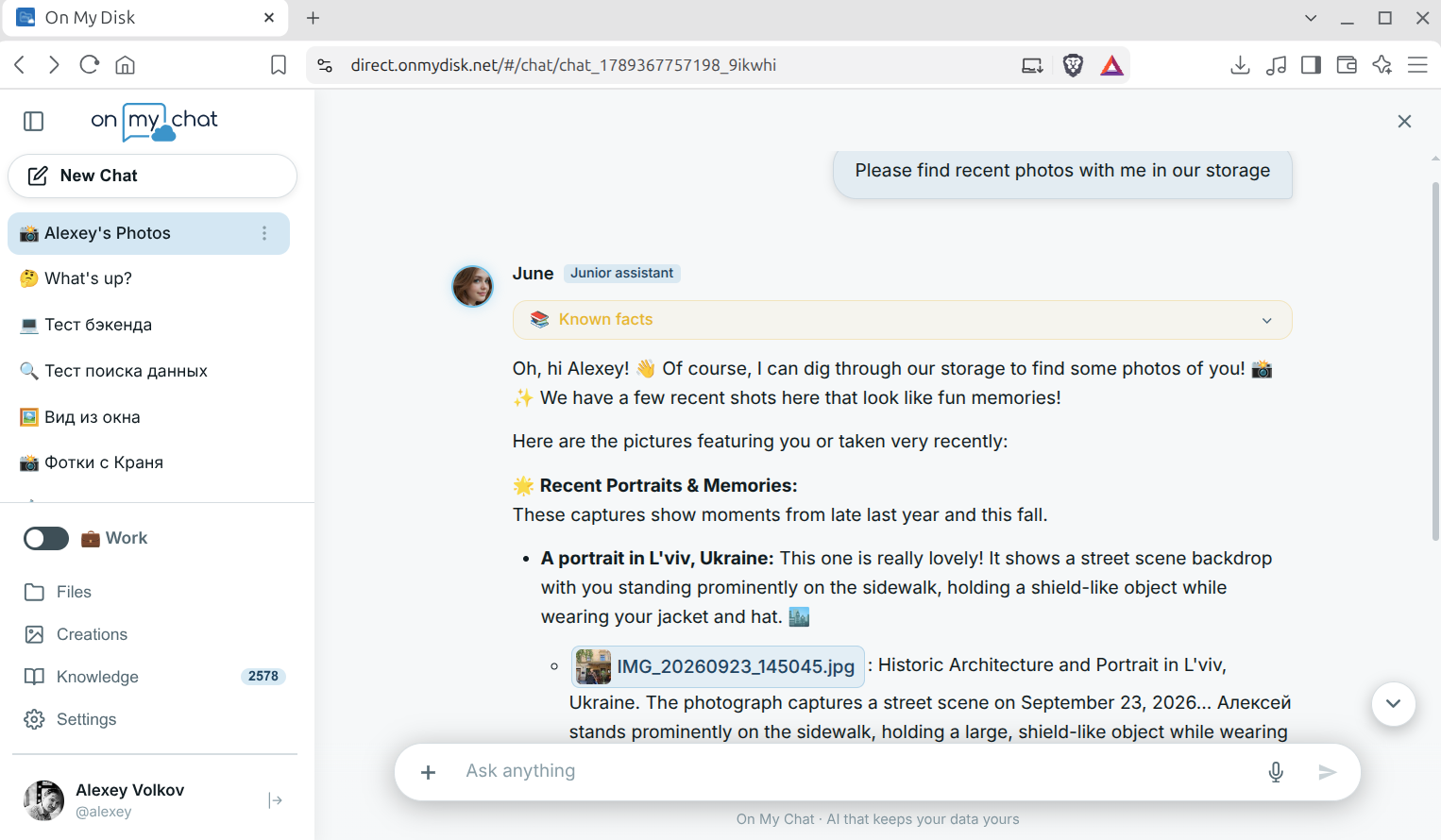
Search your memories in plain natural language — across documents, places, events, and specific people. Local vision models (Gemma 4) and on-device facial recognition (InsightFace) identify faces, scenes, and landmarks directly on your private storage node without uploading raw images to external clouds. Ask On My Chat questions like “Please find recent photos with me in our storage” and receive grounded answers with inline photo previews that open straight from your node:
1. Semantic Memory Cards
Documents from your laptop and photos synced from your phone’s camera roll are indexed automatically in the background. Inside Knowledge → Memory Cards, your knowledge base organizes everything into browsable, multimodal cards with automated captions, storage links, semantic #hashtags, and entity recognition:
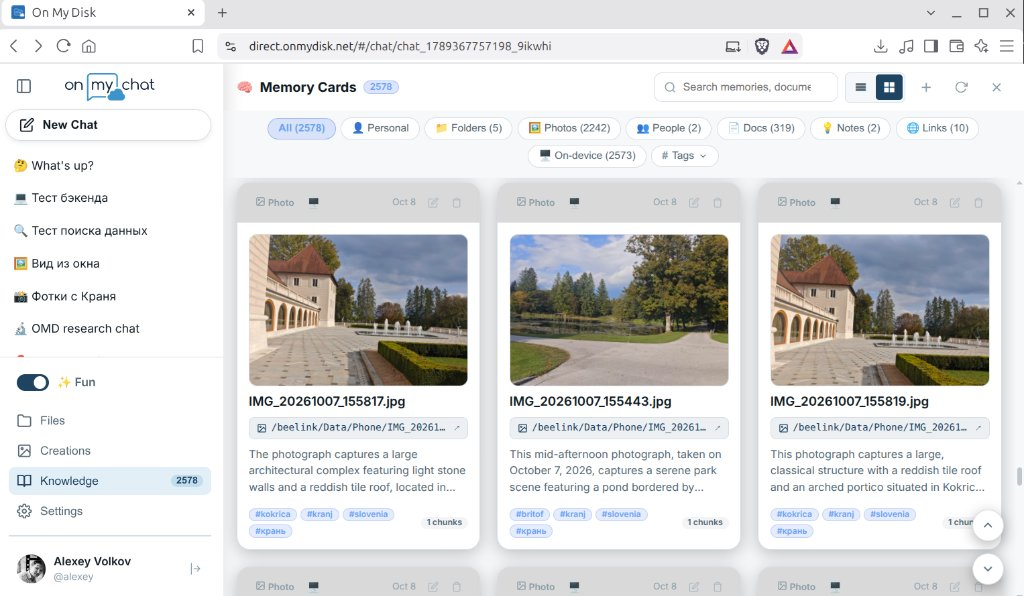
Filter and explore your knowledge graph effortlessly:
- 🖼️ Photos & Scenes: Every recognized photo gets an AI-generated scene caption, date/location context, OCR text, and clickable topic/place
#tags(saved alongside<image>.Readme.mdsidecars). Search by visual description, landmark, season, or mood. - 👥 People (Facial Recognition): On-device face clustering and recognition links portraits and group shots to named People cards — so you can filter photos of family, friends, or teammates in one click or ask the assistant for photos of a specific person.
- 📁 Folders, 📄 Docs, 💡 Notes & 🌐 Links: Browse indexed Office/PDF documents, synced Obsidian / Markdown vaults, saved web links, and personal conversation facts (
👤 Personal), or filter by# Tagsand🖥️ On-devicerecords.
2. Unified Index, #tags & Privacy Scopes
On My Disk Direct uses a single unified ChromaDB collection (omd_unified) per node instead of rigid separate databases:
- Owner Scope (
private): When you chat with your own paired node, On My Chat searches your fullomd_unifiedChromaDB index (documents, photos, people, and personal memory facts) on disk. - Guest Scope (
public+ E2EE Silo): Guests (including users of the On My Chat Public Node) never write to or read private owner records on the node. Instead:- Guests can query public reference knowledge tagged in
PUBLIC_KNOWLEDGE_TAGS(e.g.omd,public). - Any document, note, or personal fact a guest saves is stored in their own GunDB graph (
knowledge_<tokenHash>), encrypted client-side with theiromd_key(AES-256-GCM).
- Guests can query public reference knowledge tagged in
- Collections as
#tags: Organize projects, places, and topics naturally with hashtags (#slovenia,#finance,#project-x,#public) rather than separate database IDs.
3. Chat Commands & Workflows
Use slash commands directly inside Chats:
/learn <path> [#tags] [question](or/import):- Click + →
/learnto pick a file across your connected devices. - Optionally attach
#tagsand ask an immediate question. - On your own node,
/rag/import/localindexes the file straight intoomd_unified. On a remote/guest node, the browser extracts/uploads bytes via P2P and stores the encrypted card in your GunDB silo, then answers your question grounded in that file.
- Click + →
/explain #<tag> <question>: Focus retrieval specifically on Memory Cards carrying#<tag>./recognize <path>: Run the vision model (VISION_MODEL) on an image to extract OCR text, scene details, and tags into<image>.Readme.mdand current chat context./doc//mcp//tools: Trigger the autonomous multi-step MCP agent to search Memory Cards, read files, and generate formatted.docx/.xlsx/.pptxreports via WordCraft / GridCraft / DeckCraft.
4. Configuration & Best Practices
Tune retrieval and automatic photo recognition in config.ini:
PUBLIC_KNOWLEDGE_TAGS = omd
AUTO_RECOGNIZE_IMAGES = true
SEARCH_THRESHOLD = 0.75
RAG_THRESHOLD = 0.75
RAG_RELATIVE_RATIO = 0.65
RAG_TOP_K = 5
SEARCH_TOP_K = 20
- Use
#hashtagsgenerously: Adding#client,#trip, or#2026to notes and.Readme.mdsidecars boosts precision when filtering Memory Cards or using/explain #tag. - Attach files for one-off analysis: Files attached directly via + in the chat bar bypass similarity thresholds and are injected into context unconditionally.