⚡ AI Horde Client & Built-in ComfyUI Dreamer Worker
On My Chat integrates natively with AI Horde — a crowdsourced, distributed cluster of community GPU workers for text and image generation — both as a Hybrid Client and as a built-in, idle-aware ComfyUI Image Worker (“Dreamer”).
- As a Client (
hybrid/hordemodes): Keep your private documents, spreadsheets, and code strictly local on Ollama in Work Mode, while seamlessly tapping into massive 70B–123B community models on AI Horde for creative storytelling and roleplay in Fun Mode — complete with 1-click SillyTavern Character Card (.png/.json) import. - As a Worker (
/horde): Whenever your local ComfyUI queue is idle, On My Chat can automatically pick up image generation jobs from AI Horde (hordelib-compatible SDXL text-to-image pipeline and optional daily-cappedKrea 2), render them in the background, and earn Kudos for your account.
1. Hybrid Mode: Local Work RAG + AI Horde Roleplay
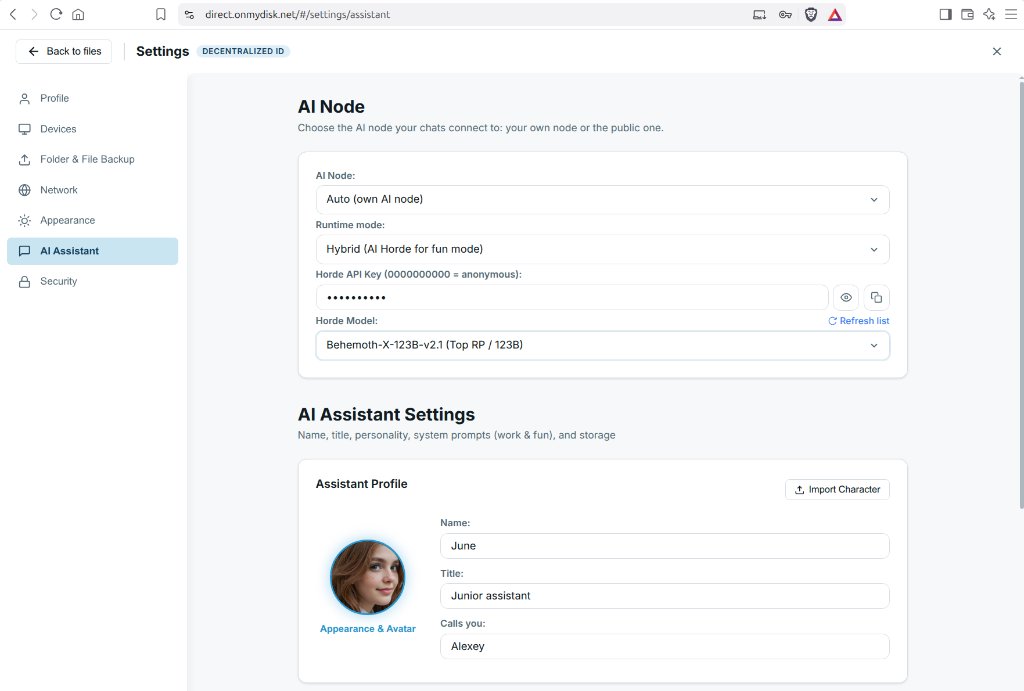
In Settings → AI Assistant → AI Node (or in /opt/onmychat/config.ini), you can select how On My Chat routes your requests:
| Runtime Mode | Work Mode (RAG, Docs, Code, MCP) | Fun Mode (Creative Writing & Roleplay) |
|---|---|---|
Local | Local Ollama (:11434) | Local Ollama (FUN_MODEL) |
Hybrid (AI Horde for fun mode) | Local Ollama (100% private local RAG) | AI Horde (70B–123B community RP models) |
AI Horde only | AI Horde | AI Horde |
Agentic P2P | Remote GPU node over WebRTC P2P | Remote GPU node over WebRTC P2P |
SillyTavern Character Card Import
Under Settings → AI Assistant → Assistant Profile, click Import Character to load any standard SillyTavern V2 Character Card (.png with embedded metadata or .json). On My Chat automatically populates the assistant’s name, persona lore, greeting, avatar, and roleplay prompt while preserving your serious Work Mode prompt for day-to-day productivity.
2. Built-in ComfyUI Dreamer Worker (/horde)
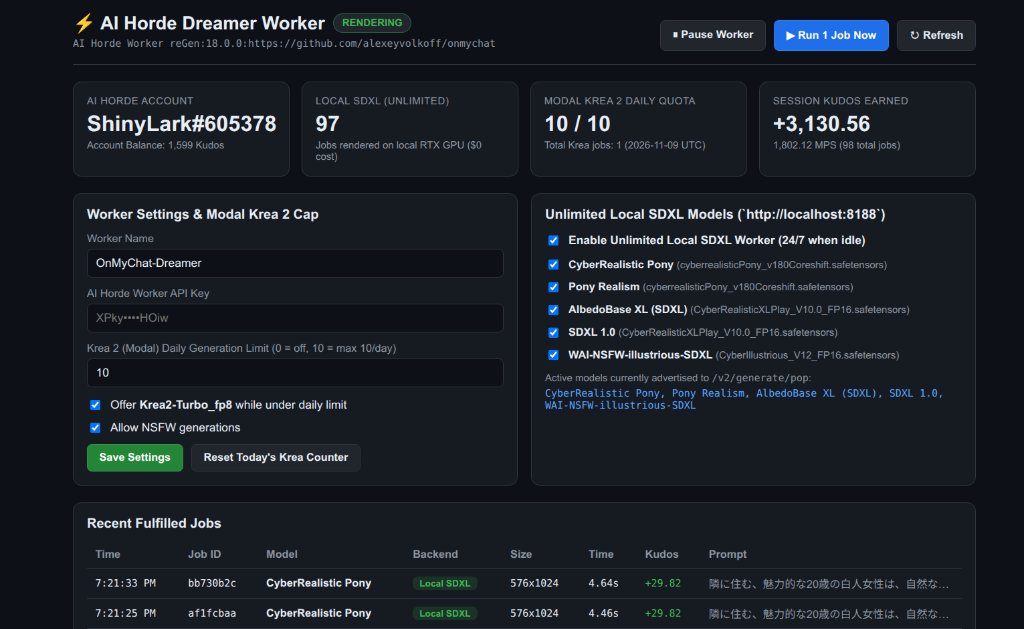
Instead of installing and maintaining a separate Docker container or standalone bridge, On My Chat includes a native AI Horde Image Worker (“Dreamer”) (horde_dreamer.py) that talks directly to your existing local ComfyUI instance (http://localhost:8188).
Key Capabilities
- Strict Idle Detection (Zero Interruption):
- Before polling
/api/v2/generate/pop, the worker checks your local ComfyUI/queue(queue_runningandqueue_pending) as well as active Studio/Autopilot locks. - If you or your node are using ComfyUI, the Dreamer worker immediately yields and waits until the GPU is completely idle.
- Before polling
hordelib-Compatible SDXL ComfyUI Pipeline:- Builds a clean, unmodified ComfyUI SDXL text-to-image graph (
CheckpointLoaderSimple -> CLIPSetLastLayer -> CLIPTextEncode -> EmptyLatentImage -> KSampler -> VAEDecode) honoring the requester’s exactsteps,cfg_scale,sampler_name,karras/scheduler,clip_skip,seed,width,height, and unmodified prompts. - Strictly offers only official AI Horde models (
AI-Horde-image-model-reference) whose exact.safetensorscheckpoints are installed in your localComfyUI/models/checkpoints/directory (e.g.,CyberRealistic Pony,Pony Realism,AlbedoBase XL (SDXL),SDXL 1.0,WAI-NSFW-illustrious-SDXL).
- Builds a clean, unmodified ComfyUI SDXL text-to-image graph (
- Optional Daily-Capped Modal
Krea2-Turbo_fp8:- If a remote Modal GPU endpoint is configured (
MODAL_COMFY_URL), you can optionally contributeKrea2-Turbo_fp8with a strict daily generation cap (e.g.HORDE_KREA_DAILY_LIMIT = 10per UTC day). Once the daily quota is reached,Krea2-Turbo_fp8is automatically removed from/v2/generate/popwhile local SDXL continues 24/7 at zero cost.
- If a remote Modal GPU endpoint is configured (
- Mandatory
horde-safety(NSFW & CSAM) Scanning & Maintenance Mode Compliance:- Every generated image is scanned via
horde-safety(NSFWCheckerwithCLIP ViT-L/14+DeepDanbooruon CPU, using 0 MB of GPU VRAM) prior to R2 upload and/v2/generate/submit. - Fail-closed safety: the worker refuses to pop jobs if
horde-safetyis unavailable, replaces CSAM or SFW-censored outputs with official AI Horde censor images (nsfw_censor_*.png), and reportsstate: "csam"/"censored"andgen_metadata. - If the worker is placed into Maintenance Mode on AI Horde, it automatically pauses polling (
enabled = false) and never auto-clears the maintenance flag.
- Every generated image is scanned via
- Built-in Web Console & P2P Node App:
- Accessible locally at
http://localhost:4000/hordeor remotely from anywhere as the AI Horde app inside On My Disk Direct via the P2P App Proxy. - Displays live status (
RENDERING/IDLE_POLLING), Kudos balance, session Megapixelsteps (MPS), model toggles, daily quota controls, and a real-time log of fulfilled jobs.
- Accessible locally at
3. Configuration (config.ini)
- Register an account and generate an API key at aihorde.net/register.
- Add or uncomment the AI Horde settings in
/opt/onmychat/config.ini(or configure them directly in the/hordeweb UI):
[settings]
# Client API key (0000000000 = anonymous client; use your key for priority queue)
HORDE_API_KEY = your_aihorde_api_key

# Built-in ComfyUI Dreamer Worker
HORDE_WORKER_ENABLED = true
HORDE_WORKER_API_KEY = your_aihorde_api_key
HORDE_WORKER_NAME = OnMyChat-Dreamer
HORDE_WORKER_NSFW = true
HORDE_WORKER_MAX_PIXELS = 1048576
HORDE_WORKER_MODELS = CyberRealistic Pony
HORDE_KREA_DAILY_LIMIT = 10

[apps]
horde = AI Horde | 4000 | /horde | gpu-card | AI Horde Dreamer Worker Console
Residential ISP & CGNAT (
UnsafeIPNotice): AI Horde uses automated IP reputation filters to block abusive VPN workers. If your residential fiber or CGNAT connection triggers a false-positiveUnsafeIPmessage in the/hordeconsole, join the Official AI Horde Discord, link your API key via/userinfo, and ask a moderator in#worker-vpn-access-requestto enable the VPN exception flag on your account.